ckeditor配合ckfinder是可以实现图片上传功能的,但是只有php和asp支持,找了几天资料,终于成功在jsp上也实现了这个功能。
参考资料: http://blog.163.com/ytrtfhj@126/blog/static/890531092010226023136/
先来效果图:
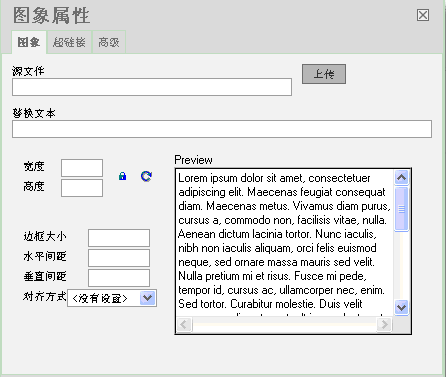

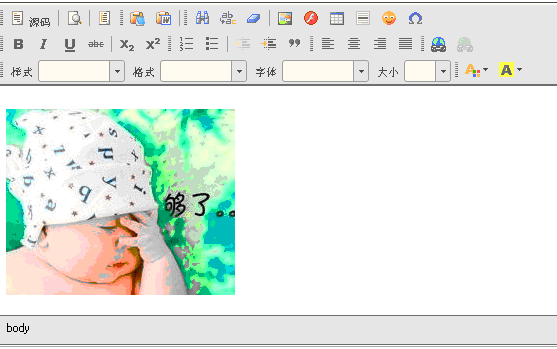
首先在编辑器完全生成后调用addUploadButton(editor)函数,传入编辑器变量,建议在CKEDITOR.replace之后直接使用。
1 | function addUploadButton(editor){ |
这里必须提醒的是要注意不同的浏览器事件驱动是不一样的,这个地方卡了我好久,因为我用firefox调试的原因,urlObj.fireEvent(“onchange”); 这句代码是不起作用的。
addUploadImage函数指定文件上传页面的URL,然后在一个模态窗口中打开这个页面,处理文件上传。最终的结果是将图片上传后在服务器上的URL地址返回给一个变量imgUrl。最后把这个变量赋值给传进来的图片URL文本框里。最后手工触发一下onchange事件,这样在image对话框里就能看到图片的预览效果了。
以下为上传jsp页面:
1 | <%@ page language="java" import="java.util.*" pageEncoding="UTF-8"%> |
上传的后台处理我用struts1.2写的。
UploadForm:1
2
3
4
5
6
7
8
9
10
11
12
13
14
15
16
17
18
19package com.newsManage_10.struts.form;
import org.apache.struts.action.ActionForm;
import org.apache.struts.upload.FormFile;
public class UploadForm extends ActionForm {
private static final long serialVersionUID = 1L;
private FormFile imgFile;
public FormFile getImgFile() {
return imgFile;
}
public void setImgFile(FormFile imgFile) {
this.imgFile = imgFile;
}
}
ImgUploadAction:1
2
3
4
5
6
7
8
9
10
11
12
13
14
15
16
17
18
19
20
21
22
23
24
25
26
27
28
29
30
31
32
33
34
35
36
37
38
39
40
41
42
43
44
45
46
47
48
49
50
51
52
53
54
55
56
57
58
59
60
61
62
63
64
65
66
67
68
69
70
71
72
73
74
75
76
77
78
79
80
81
82
83
84
85
86
87
88
89
90
91
92
93
94
95
96
97
98
99
100
101
102
103
104
105
106
107
108
109
110
111
112
113
114
115
116
117
118
119
120
121
122
123
124
125
126
127
128
129
130
131
132
133
134
135
136package com.newsManage_10.struts.action;
import java.io.File;
import java.io.FileNotFoundException;
import java.io.FileOutputStream;
import java.io.IOException;
import java.io.InputStream;
import java.io.OutputStream;
import java.util.Date;
import javax.servlet.ServletContext;
import javax.servlet.http.HttpServletRequest;
import javax.servlet.http.HttpServletResponse;
import org.apache.struts.action.ActionForm;
import org.apache.struts.action.ActionForward;
import org.apache.struts.action.ActionMapping;
import org.apache.struts.actions.DispatchAction;
import org.apache.struts.upload.FormFile;
import com.newsManage_10.struts.form.UploadForm;
public class ImgUploadAction extends DispatchAction {
protected ActionForward unspecified(ActionMapping mapping, ActionForm form,
HttpServletRequest request, HttpServletResponse response)
throws Exception {
System.out.println("上传图片");
//获取webroot目录下的upload文件夹的地址,注意要是加入了spring会报空指针异常要更改为
//ServletContext servletContext = request.getSession().getServletContext();
//String url = servletContext.getRealPath("/upload") + "\\";
String url = servlet.getServletContext().getRealPath("/upload") + "\\";
int fsize = 5 * 1024 * 1024;
UploadForm upf = (UploadForm) form;
FormFile ffi = upf.getImgFile();
String fileName = ffi.getFileName();
if (!((fileName.toLowerCase().endsWith(".jpg"))
|| (fileName.toLowerCase().endsWith(".gif")) || (fileName
.toLowerCase().endsWith(".png")))) {
System.out.println("文件类型错误不能上传");
return null;
}
if (ffi.getFileSize() > fsize) {
System.out.println("文件大于限定大小不能上传");
return null;
}
String fname = null; //完整地址
String shortName = null; //文件名含后缀
try {
if ("".equals(fileName)) {
return null;
}
InputStream stream = ffi.getInputStream();
String extendFile = null;
if (isJpg(fileName))
extendFile = ".jpg";
else if (isGif(fileName))
extendFile = ".gif";
else if (isPng(fileName))
extendFile = ".png";
else
extendFile = ".jpg";
shortName = timename() + extendFile;
fname = url + shortName;//重命名
File imgFile = new File(fname);
//如果不存在先创建
if(!imgFile.exists())
{
imgFile.createNewFile();
}
//写入服务器
OutputStream bos = new FileOutputStream(imgFile);
int bytesRead = 0;
byte[] buffer = new byte[8192];
while ((bytesRead = stream.read(buffer, 0, 8192)) != -1) {
bos.write(buffer, 0, bytesRead);
}
bos.close();
stream.close();
} catch (FileNotFoundException fnfe) {
fnfe.printStackTrace();
} catch (IOException ioe) {
ioe.printStackTrace();
} catch (NullPointerException e) {
e.printStackTrace();
}
//不能存d:\这种地址,要url
String path = "http://" + request.getServerName() + ":" + request.getServerPort() + request.getContextPath() + "/upload/" + shortName;
request.setAttribute("pagePath", path);
return mapping.findForward("success");//跳转到成功页面
}
//时间命名图片
public static String timename() {
String name = null;
name = Long.toString(new Date().getTime());
return name;
}
//-----文件类型判断------
public static boolean isGif(String file) {
if (file.toLowerCase().endsWith(".gif")) {
return true;
} else {
return false;
}
}
public static boolean isJpg(String file) {
if (file.toLowerCase().endsWith(".jpg")) {
return true;
} else {
return false;
}
}
public static boolean isPng(String file) {
if (file.toLowerCase().endsWith(".png")) {
return true;
} else {
return false;
}
}
}
struts的配置文件相关部分由于我用了spring所以type内容有所不同
1 | <action |
1 | <form-bean name="UploadForm" type="com.newsManage_10.struts.form.UploadForm" /><pre name="code" class="java"> |