ckeditor在jsp下增加图片上传功能(2)

之前写的文章https://blog.lihui.info/ckeditor-jsp-upload-image.html说明了如何在jsp中手动开启ckeditor的图片上传,但是毕竟是自己写的上传界面,实在是丑。查了更多资料,发现还有更好更简单的方法。

之前参考的http://blog.163.com/ytrtfhj@126/blog/static/890531092010226023136/http://topic.csdn.net/u/20100127/11/d2254308-db90-4b1f-adca-b36bd8956264.html都尝试开启ckeditor默认的图片上传,但是都没能成功上传到后台,这可能是由于他们回调函数调用错误。

感谢http://sarin.iteye.com/blog/599499的作者,他的方法最简单美观,也解决了最根本的问题。
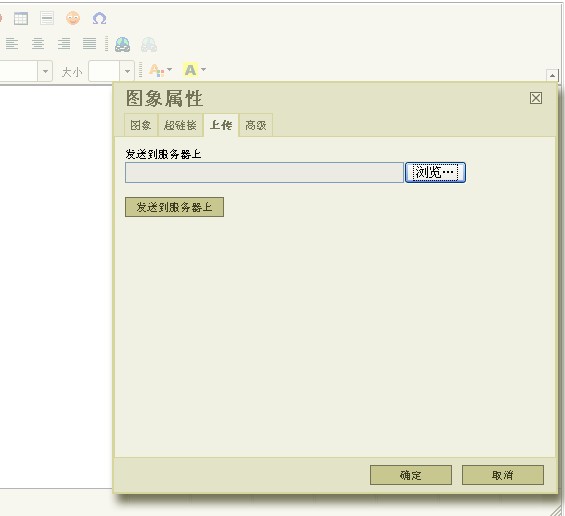
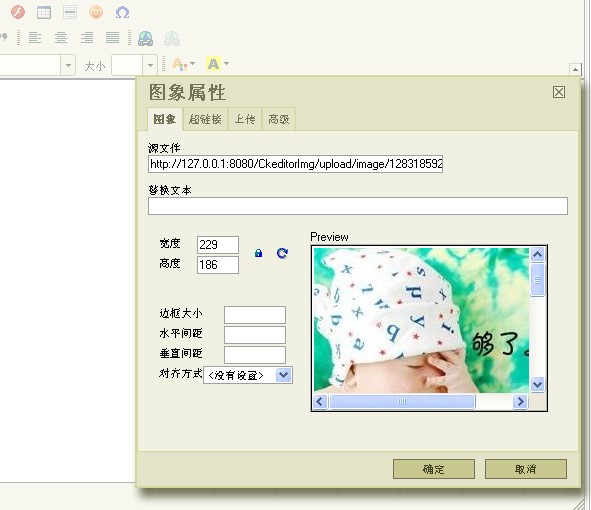


总结了下其实开启上传功能非常简单,前台只需要以下代码:

1
2
3
4
5
//这后面加的参数分别是上传文件,图片和flash  
CKEDITOR.replace( 'context',{filebrowserUploadUrl : 'ckupload.do?type=file',
filebrowserImageUploadUrl : 'ckupload.do?type=image',
filebrowserFlashUploadUrl : 'ckupload.do?type=flash'
});

后台可以用apache commons组件中的fileupload和io包进行上传操作。用struts1.2简单写了后台,注意struts1.2自带的包里缺少一些方法,要加入附件的包。

1
2
3
4
5
6
7
8
9
10
11
12
13
14
15
16
17
18
19
20
21
22
23
24
25
26
27
28
29
30
31
32
33
34
35
36
37
38
39
40
41
42
43
44
45
46
47
48
49
50
51
52
53
54
55
56
57
58
59
60
61
62
63
64
65
66
67
68
69
70
71
72
73
74
75
76
77
78
79
80
81
82
83
84
85
86
87
88
89
90
91
92
93
94
95
96
97
98
99
100
101
102
103
104
105
106
107
108
109
110
111
112
113
114
115
116
117
118
119
120
121
122
123
124
125
126
127
128
129
130
131
132
133
134
135
136
137
138
139
140
141
142
143
144
145
146
147
148
149
package info.hellolihui.action;  

import java.io.File;
import java.io.PrintWriter;
import java.util.Date;
import java.util.Arrays;
import java.util.HashMap;
import java.util.Iterator;
import java.util.List;
import java.util.Map;

import javax.servlet.ServletContext;
import javax.servlet.http.HttpServletRequest;
import javax.servlet.http.HttpServletResponse;

import org.apache.commons.fileupload.FileItem;
import org.apache.commons.fileupload.FileItemFactory;
import org.apache.commons.fileupload.disk.DiskFileItemFactory;
import org.apache.commons.fileupload.servlet.ServletFileUpload;
import org.apache.struts.action.ActionForm;
import org.apache.struts.action.ActionForward;
import org.apache.struts.action.ActionMapping;
import org.apache.struts.actions.DispatchAction;


public class CKUploadAction extends DispatchAction {

//允许上传的文件后缀名
private final String[] exts = new String[]{"gif","png","jpeg","jpg","bmp"};

@Override
public ActionForward unspecified(ActionMapping mapping, ActionForm form,
HttpServletRequest request, HttpServletResponse response)
throws Exception {
System.out.println("上传");

ServletContext servletContext = request.getSession().getServletContext();

// 设定上传文件路径
String path = servletContext.getRealPath("/upload") + "/";

String typeStr = request.getParameter("type");
//如果type为空则默认为上传文件
if (typeStr == null) {
typeStr = "file";
}
path += typeStr;

// 判断文件夹是否存在,不存在则创建,此时的path还未加上文件名,为http://127.0.0.1:8080/xx/upload的格式
File dirTest = new File(path);
if (!dirTest.exists()) {
dirTest.mkdirs();
}

System.out.println(path);

//使用Apache Common组件中的fileupload进行文件上传
FileItemFactory factory = new DiskFileItemFactory();
ServletFileUpload upload = new ServletFileUpload(factory);

// 文件名和文件真实路径
String newName = "";
String fileUrl = "";
String fileName = ""; //只有文件名
try {
List items = upload.parseRequest(request);
Map fields = new HashMap();
Iterator iter = items.iterator();
while (iter.hasNext()) {
FileItem item = (FileItem) iter.next();
if (item.isFormField())
fields.put(item.getFieldName(), item.getString());
else
fields.put(item.getFieldName(), item);
}
// CEKditor中file域的name值是upload
FileItem uplFile = (FileItem) fields.get("upload");
// 获取文件名并做处理
String fileNameLong = uplFile.getName();
fileNameLong = fileNameLong.replace('\\', '/');
String[] pathParts = fileNameLong.split("/");
fileName = pathParts[pathParts.length - 1];
// 获取文件扩展名
String ext = getExtension(fileName);
// 设置上传文件名以时间命名
fileName = new Date().getTime() + "." + ext;
// 获取文件名(无扩展名)
String nameWithoutExt = getNameWithoutExtension(fileName);
File pathToSave = new File(path, fileName);
fileUrl = path + "/" + fileName;
if (extIsAllowed(ext)) {
int counter = 1;
while (pathToSave.exists()) {
newName = nameWithoutExt + "_" + counter + "." + ext;
fileUrl = path + "/" + newName;
pathToSave = new File(path, newName);
counter++;
}
uplFile.write(pathToSave);
} else {
System.out.println("无效的文件类型: " + ext);
}
}catch (Exception ex) {
ex.printStackTrace();
}
PrintWriter out = response.getWriter();

// CKEditorFuncNum是回调时显示的位置,这个参数必须有
//不能存d:\这种地址,要url
String url = "http://" + request.getServerName() + ":" + request.getServerPort() + request.getContextPath() + "/upload/" + typeStr + "/" + fileName;
String callback = request.getParameter("CKEditorFuncNum");
out.println("<script type=\"text/javascript\">");
out.println("window.parent.CKEDITOR.tools.callFunction(" + callback
+ ",'" + url + "',''" + ")");
out.println("</script>");
out.flush();
out.close();


return null;

}

/**
* 获取文件名的方法
*/
private static String getNameWithoutExtension(String fileName) {
return fileName.substring(0, fileName.lastIndexOf("."));
}

/**
* 获取扩展名的方法
*/
private String getExtension(String fileName) {
return fileName.substring(fileName.lastIndexOf(".") + 1);
}

/**
* 判断扩展名是否允许的方法
*/
private boolean extIsAllowed(String ext) {
ext = ext.toLowerCase();
List extList = Arrays.asList(this.exts);
return extList.contains(ext)?true:false;
}


}

commons-io-1.4-bin:[commons-io-1.4-bin.zip]

commons-fileupload-1.2.2-bin:[commons-fileupload-1.2.2-bin.zip]